R 4.2.0 New Feature: How to Use Base Pipe |> and Differences from %>%
Published May 1, 2022
⋅
Updated Nov 3, 2025
⋅
11 minutes read
Note
This old post is translated by AI.
This article was migrated from excel2rlang.com.
2022/5/22 Update: I received information on Twitter from @eitsupi that "When using the Base pipe placeholder more than once, it repeatedly evaluates the processing before the pipe that many times"!
Considering this specification, I thought the day when placeholders can be used more than once may never come 🤔. I've added details in the "Addendum" section.
Hello. Thank you for the very easy-to-understand article.
Regarding not being able to use the placeholder twice, I believe this is intentional.
As mentioned in the post below, the base pipe evaluates the contents of _ as-is, so using it multiple times multiplies the computation. https://t.co/A8Oxi3B4Qn
Hello! This blog originally started as a place to provide beginner-friendly content, but I'm running out of topics and motivation is getting hard to maintain, so I'm thinking of writing miscellaneous articles and latest information from now on 🌜
The first topic after making this decision is a super timely one: "What is the recently introduced Native pipe?" Honestly, I feel like this article is going to be quite long, but since it's something I've been curious about for a while, I'll do my best to summarize it.
This time I'll write in a relaxed style rather than tutorial mode!
##What Is a Pipe Anyway?
###A Review of %>%
%>%
This is called the pipe operator. In English, it's called pipe. There probably isn't anyone who has never seen it. It's a function that doesn't exist in R's standard features (base R), and because it was extremely compatible with R's characteristics as a data analysis language, it became explosively popular. And now it has become the de facto standard in R.
###History of %>% Birth
When I started studying R around 2015, the {magrittr} pipe had already swept through the R community, so I didn't know much about its origins. When I researched the history of pipes, Adolfo Álvarez's blog post had an excellent summary. This article references Adolfo's summary.
(Translation) How can I implement F# language's pipe operator in R? For example, if I want to use functions foo and bar consecutively, I'd like to write it like this:
data |> foo |> bar
This question was solved just one hour later by Benjamin Bolker.
(Translation) I don't know how useful it actually is, but at least it seems possible for functions with one argument (?)
This person is amazing, right? By defining a function called %>%, pipe operation was largely achieved. But it still feels like a primitive function.
After that, in the {plyr} package project (the prototype of {dplyr}) started by Hadley Wickham in 2012, a chain() function enabling pipe operations was introduced, and in 2013 the pipe operator %.% was introduced.
Stefan continued to actively improve the pipe, and his work at that time later became the {magrittr} package.
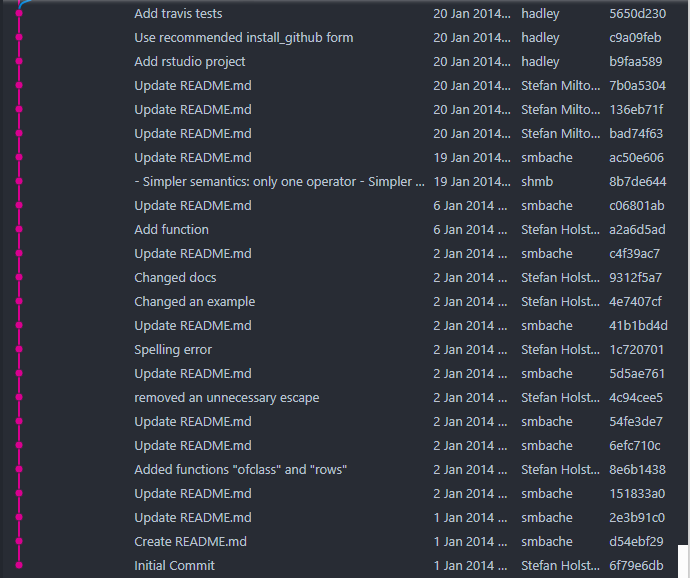
Looking at magrittr's commit history, Stefan started development on January 1, 2014, and just 19 days later Hadley Wickham also committed. You can see that Hadley was collaborating from the very beginning.
By the way, {magrittr} is pronounced "magrittar," and it's derived from René Magritte's 1929 painting "The Treachery of Images". This painting is an artistic work saying "No matter how realistic a painting is, it's just a painting. So the pipe drawn in this painting is not a pipe." Needless to say, they associated the name "pipe" with this painting and made a pun with the artist's name "Magritt." How stylish.
Meanwhile, regarding Hadley's %.% mentioned earlier, Hadley himself discontinued development because it's better to be able to input while holding the <kbd>Shift</kbd> key. That same year, the <kbd>Ctrl</kbd>+<kbd>Shift</kbd>+<kbd>M</kbd> keyboard shortcut was implemented in RStudio, and things picked up quickly. Thus the %>% developed in magrittr became the mainstream until now.
At the time of last year's official release, |> was still weak and couldn't replace all of %>%, which had already been thoroughly researched for various applications. However, in R 4.2.0 released this time, the features were further expanded, and it became possible to replace most of the existing %>% with |>. And from the fact that using |> going forward is being recommended in various places and %>% is disappearing from various people's presentation slides, I feel the trend is clearly changing.
From what I've seen in the R community over the past several years, technologies that got hyped up sometimes became obsolete in an instant (cf. pipeR), so I really can't predict whether |> will definitely become mainstream 😓
##Differences Between %>% and |>
That said, can it really be used daily? RStudio already has an option to change the keyboard shortcut to |>[ref]If your RStudio and R versions are new enough, it's already a selectable option 😃[/ref], but is it really okay to change? You might be suspicious. So I thoroughly investigated the differences, referring to voices on Twitter and Hadley's R4DS etc.!
My conclusion from the investigation is that %>% and |> are fairly different. Basically, |> is designed to work simply and lightweight 🤔
I'll introduce them in order of frequency of appearance and importance to remember, not by whether properties are the same.
###Same Point: When Normally Passing to the First Argument
When using the pipe's property "implicitly pass the left result to the right function's first argument if not specified," you can use it the same as before.
library(tidyverse)starwars %>% filter(height > 100) %>% head(2)# # A tibble: 2 × 14# name height mass hair_color skin_color eye_color# <chr> <int> <dbl> <chr> <chr> <chr># 1 Luke Skywalker 172 77 blond fair blue# 2 C-3PO 167 75 NA gold yellow# # … with 8 more variables: birth_year <dbl>, sex <chr>,# # gender <chr>, homeworld <chr>, species <chr>,# # films <list>, vehicles <list>, starships <list>
starwars |> filter(height > 100) |> head(2)# # A tibble: 2 × 14# name height mass hair_color skin_color eye_color# <chr> <int> <dbl> <chr> <chr> <chr># 1 Luke Skywalker 172 77 blond fair blue# 2 C-3PO 167 75 NA gold yellow# # … with 8 more variables: birth_year <dbl>, sex <chr>,# # gender <chr>, homeworld <chr>, species <chr>,# # films <list>, vehicles <list>, starships <list>
###Different Point: Parentheses Cannot Be Omitted
Personally, I don't recommend this notation as it can be a source of bugs.
%>% allows you to omit the parentheses[ref]Called parentheses.[/ref] after the function name when not specifying complicated arguments.
starwars |> na.omit() |> pull(mass) |> mean# Error: The pipe operator requires a function call as RHS
###Different Point: Placeholder Character Changed from . to _
As mentioned earlier, pipes implicitly use the first argument. However, when you want to use an argument other than the first, you use a character called a placeholder. In {magrittr}'s %>%, the placeholder was . (dot).
1:100 %>% mean(x = .)# [1] 50.5
On the other hand, |>'s placeholder became _ (underscore). This placeholder was introduced in R 4.2.0 and is why the base pipe became practical.
The example shown here behaves exactly the same as {magrittr}'s pipe.
1:100 |> mean(x = _)# [1] 50.5
###Different Point: %>% Is a Function, |> Is Not a Function
As mentioned in the pipe history, %>% is a function that was created later. Also, obviously it's a function from the {magrittr} or {tidyverse} package, so you can't use it without loading these.
So what is |>? It's actually called syntactic sugar, not a function. Theoretically it's said to be slightly faster than functions, but I don't think it's visibly faster.
###Different Point: Placeholder Cannot Be Used Without Specifying Argument Name
"Cannot be used without specifying argument name"? You might wonder what this means 🤔, but seeing it is probably faster.
Previous pipes could execute as long as R could interpret, without explicitly showing which argument the placeholder goes to.
1:100 %>% mean(.)# [1] 50.5
However, base pipe will error unless you explicitly specify the argument name.
1:100 |> mean(_)# Error: pipe placeholder can only be used as a named argument
The error message also conveys this. It works fine if you properly specify the argument name as follows:
1:100 |> mean(x = _)# [1] 50.5
This specification is honestly inconvenient 👎 It might be improved in future updates, so let's wait with expectations.
###Different Point: Can't Do paste(, _)
Let me reveal first: this is completely caused by the argument name × placeholder issue mentioned earlier.
As you know, paste() is a very frequently used function for string manipulation.
And |>'s placeholder _ cannot be used more than once 😨
1:10 %>% rnorm(n = _, mean = _)# Error in 1:10 %>% rnorm(n = "_", mean = "_") :# invalid use of pipe placeholder
Also, what is implicitly given to the first argument also counts as one placeholder use, so you can't use the placeholder again. This means using placeholders within tidyverse functions is practically impossible.
starwars |> mutate(newcolumn = nrow(_))# Error in mutate(starwars, newcolumn = nrow("_")) :# invalid use of pipe placeholder
This is a high-level inconvenience... There might be some specification change in the future. That said, recent dplyr and tidyr functions are designed so you don't need to use placeholders in messy ways, and there's a possibility that tidyverse will make specification changes to match base pipe.
I've added reasons why using placeholders more than once is difficult due to the specification.
###Different Point: Cannot Pipe to for
I saw this on Twitter and was surprised "Oh, there's such a way to use pipes!? 😲" - apparently with previous pipes you could pass values to for loop variables.
1:10 %>% for (i in .) print(i)# [1] 1# [1] 2# [1] 3# [1] 4# [1] 5# [1] 6# [1] 7# [1] 8# [1] 9# [1] 10
I somehow felt it wouldn't work with |>, and indeed it doesn't. I investigated why it doesn't work, but couldn't figure out the reason...
1:10 %>% for (i in _) print(i)# Error in 1:10 %>% for (i in "_") print(i) :# invalid use of pipe placeholder
Actually Stop Using for Loops and Use purrr::map()
When piping in R and wanting to loop... you don't use for loops.
If you think "Well, how do you loop then!?", learn purrr::map() right now. Using the derivative furrr::future_map() makes multi-processing easy, and it's designed to be used with pipes.
purrr::map() requires a bit of getting used to, so I'll write an introduction article sometime 😤
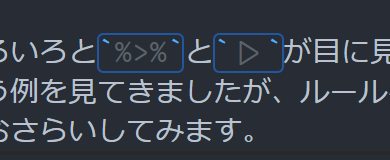
Do you know about ligatures? Ligatures are special fonts where - and > side by side combine into a beautiful arrow. The new pipe also becomes a nice triangle ligature, so it looks better than %>% visually.
If you want to quickly try ligatures, Fira Code is recommended 👍
|> becomes this kind of triangle (VScode). RStudio also supports ligatures ♪
##Recap of Differences
We've seen various examples where %>% and |> visibly differ, so let's recap the rules.
Rules of |>
Basic usage is implicitly passing values to the first argument
Use _ as placeholder
Placeholder _ cannot be used more than once simultaneously
When using placeholder _, you must specify argument_name=
The underlined two rules feel like the biggest regulations as of R 4.2.0... There will definitely be troublesome moments in the future, but at least Hadley Wickham, the god of R, recommends using base pipe, so I think there's no loss in switching to base pipe.
So this time I summarized what I learned about the new base pipe! It's a rare long weekend so I'll relax~. See you ♨️
##Addendum - Base Pipe's Placeholder Evaluates Processing On the Spot
The same point seems to have been made in the following R-devel mailing list (@eitsupi, thank you for the information!!).